
Queries in GSC are the exact search terms people typed into Google that caused your site to appear in search results.
You see queries in the GSC Performance report, usually when your boss asks a simple question: “What are people that actually searching for that related to our restaurant?”
Unfortunately, the data can feel noisy, and its accountability feels thin, which makes your boss see your SEO efforts as “soft”. But once you know how to interpret this data, not just export it, you can defend your decisions to executives and finally answer that question with clarity that you can measure.
Performance Reports Reveal Search Intent
The Performance report in GSC provides four core metrics: clicks, impressions, CTR, and average position. These metrics are reported by query, page, country, and device. So, yes, it’s sliced in a way you can actually use, not just a bunch of lists.
Queries inside the report represent real search behaviour, not keyword ideas or volume estimates. These queries are actual words that triggered your pages to show up in Google’s results.
This report shows a lot of your site’s top queries. However, viewing this data without context can turn metrics into only decoration. Presenting numbers without a narrative will make your report feel “meh”, won’t it?
Restaurant owners usually want to know whether those queries drove revenue and whether the restaurant’s messaging matched website visitors’ intent. Your boss also wants to know whether being seen on Google can make people act to interact with your restaurant.
You’re probably seduced to screenshot the top 10 queries by impressions. But remember a thing below.
Sorting by impressions and screenshotting the top 10 won’t answer whether those searches drove revenue or whether visibility translated into action.
Vicky Laurentina, 2026
Use the sequence below instead. If you run a restaurant, these interpretation steps matter because queries determine whether new customers can find you, choose you, and come back. Everything else in this report is just evidence.
How to interpret queries in GSC
- Open Performance → Search results in GSC
Search results are a menu that shows which queries actually drive Google visitors to your website.
- Switch to the Queries tab.
This tab is answering “What did someone type in Google before my link appeared?”
- Read Impressions first.
High impressions for a query means Google believes your page is relevant for Google visitors’ intent. Low impressions indicate that Google is not yet confident enough to recommend your page to visitors. Once Google is willing to show your page, clicks tell you whether users accept that recommendation.
- Use Clicks.
Any queries with high impressions but low clicks indicate that your titles or descriptions don’t attract people to engage with your content. But low impressions with high clicks is positioning opportunity.
- Use CTR.
The Click-through-rate tab measures whether your promise in the title or metadescription matches what people expect to see.
- Use position.
Ranking for your brand’s name is expected, but ranking for a non-branded query is how new customers discover you.
In plain terms, impressions tell you whether Google trusts you. Meanwhile, clicks tell you whether customers choose you, and CTR tells you whether your messages make sense.
So when executives ask what’s working on your content, you can now point to specific queries that drive revenue, not just traffic. You can explain why your high impressions aren’t followed by high clicks. Also, explain why being held in position 3 isn’t something to worry about, as long as CTR is still 12%.
(That’s the difference between a clear promise and a vague one. Have you kept saying things, but not actually promised anything concrete?)
Understanding Total Queries and Volume
Up to 1,000 queries are shown in GSC. It limits what you see based on time range (a longer date range shows more queries, but they are aggregated differently), search type (web, image, video, and news), and filters.
Look at this table to understand why you see different amounts of query counts for your website than anyone else’s.
| Factors Affecting Query Counts | How It Works | Common Mistakes to Avoid in Interpreting Query Counts |
| Privacy thresholds | Google hides queries with very few searches to protect user identity | Assuming query count equals total market demand (e.g, 400 queries ≠ 400 people) |
| Time range | Longer date ranges show more queries, but aggregate differently | Not accounting for query variations from same person |
| Search type | Web, Image, Video tracked separately | Expecting complete visibility across all search types |
| Property type | Domain properties show broader data than URL-prefix properties | Thinking low query count = low demand (might be content relevance issue) |
(I sourced a few pieces of information in the table above from Search Console Help.)
Separating Branded from Non-Branded Searches
Branded queries are search terms that include your brand name, product or service names, or your brand combined with location or product descriptors. These searches indicate existing awareness, built by people who already know you exist and are specifically looking for you. Examples of branded queries: “Gudeg Yu Soem Jalan Surapati” (exact brand + location), or “Gudeg Yu Soem menu” (brand + product category).
Differ these kinds of queries from non-branded queries, which represent discovery. These queries are typed by people searching for a solution you provide, but not yet aware of your establishment.
Let’s see the line between demand that you already own and demand that you still earn by looking at the infographic about examples below.
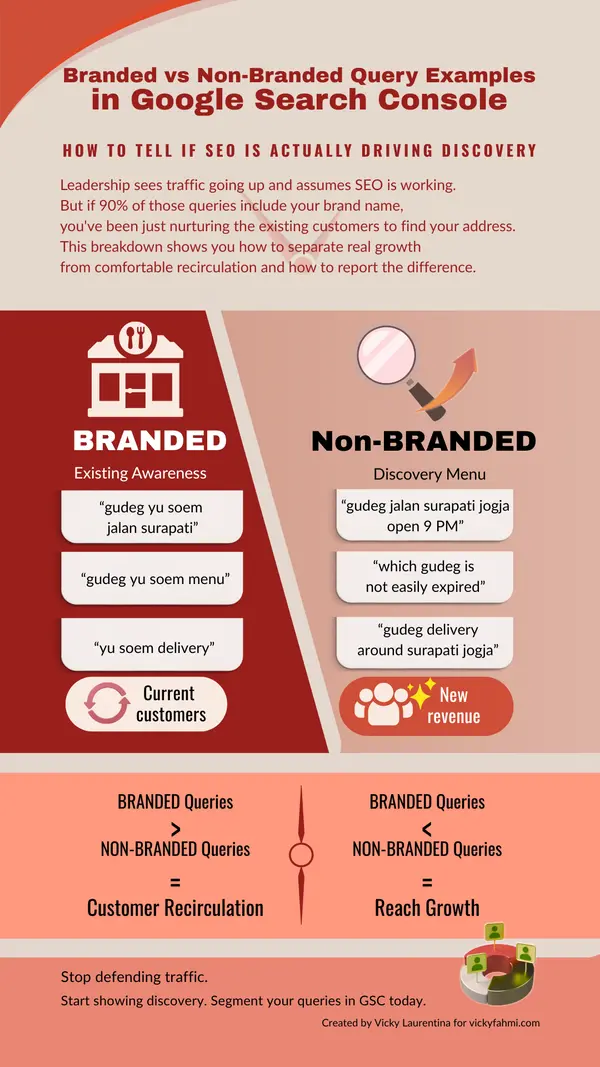
This distinction matters when you’re reporting to your boss. By looking at these distinct examples, you’ll probably change your decision and outcome.
Branded queries in your report may look impressive. But if this traffic dominated your non-branded traffic, your success is actually just because your past customers are still searching for your address. Your brand’s name is benefiting only from word of mouth and offline marketing among the same loyal base.
Meanwhile, non-branded queries that dominate your query list indicate you’re actually attracting new audiences. This situation tells you that your SEO strategy is working.
Below is the process to isolate branded queries in your GSC report.
- Open Performance → Search results in Google Search Console.
- Click + New → Query filter.
- Use “Queries containing” and input your brand name or variations.
- Export the branded query list for comparison with the non-branded queries.
To see non-branded queries, apply a “Queries not containing” filter with the same brand terms.
Compare traffic volume, CTR, and conversion rates between the two groups. If your non-branded CTR is significantly lower than your branded CTR, your messaging is resonating less with cold audiences than with warm ones. But if your non-branded queries have high impressions with low clicks, your brand is actually visible, but it’s still not compelling.
Queries tell you what people asked Google. But pages decide whether those questions can turn into revenue.
Here comes how pages should change based on query insight. If your GSC shows high impressions, but weak CTR, then the problem is how your pages frame intent. So is it if your data shows strong branded queries, but you haven’t been discovered by new customers, or if you’ve been seen a lot without conversions.
The fastest win come from tightening promises, clarifying positioning, and aligning each page to the query stage it’s already ranking for.
If you want to translate query data into page-level actions, like what to change and what to prioritise, start there.
This blog post was published on June 5th, 2022, and updated on January 25th, 2026, to give you the latest insights.

Okrai. Makin paham eike dengan situasi dan kondisi queriku kudu digimanain..
Thank you, mbak vicky. Hehhehe
Allright, Yun!